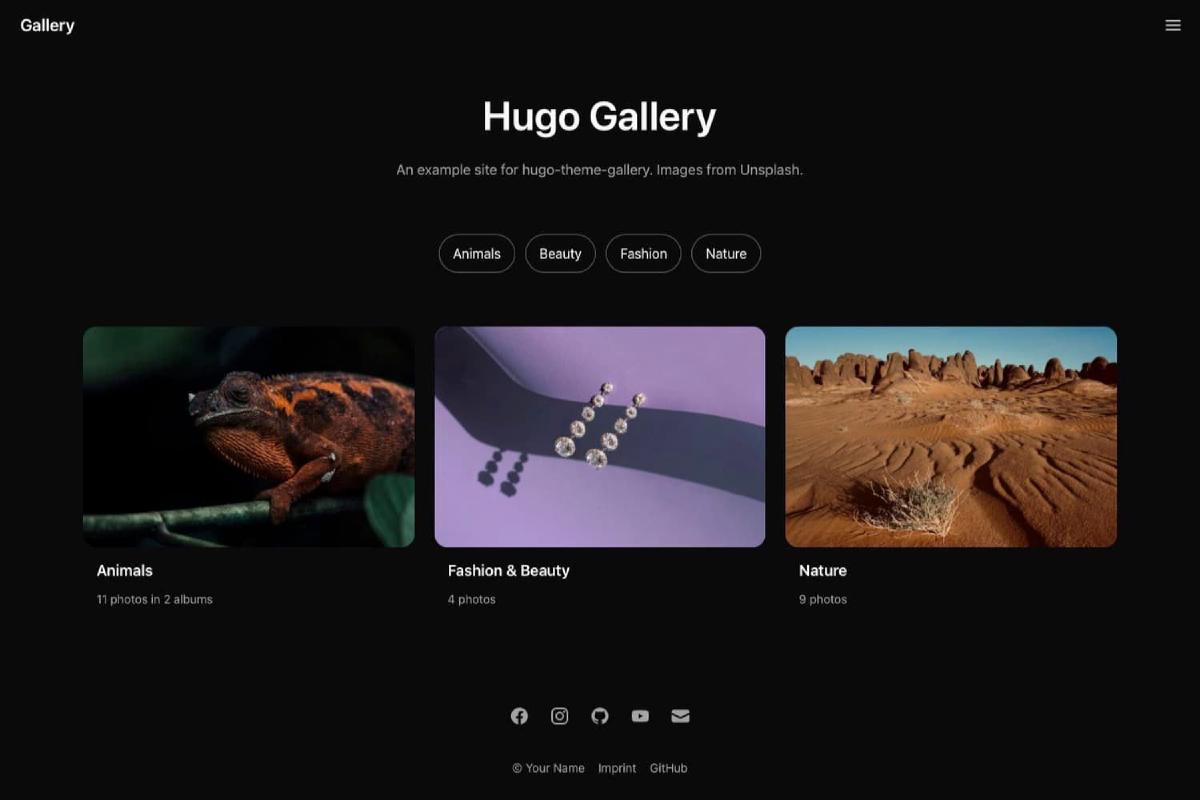

Hugo Gallery 主题:简单而实用的 Hugo 照片画廊主题#

Hugo Gallery 是一个非常简单且具有明确设计理念的 Hugo 照片画廊主题,适合想要快速搭建美观相册网站的用户。
- 主题演示地址:Demo
- 示例站点源码:Example site source
主要特点#
- 响应式设计,兼容各种设备
- 支持暗色配色方案,可为每个页面单独设置
- 支持私密相册,不在公开列表中展示
- 利用 Flickr 的 Justified Layout 实现整齐的相册视图
- 集成 PhotoSwipe 轻盒子查看图片
- SEO 优化,支持 Open Graph 标签
- 自动或手动选择封面图作为相册缩略图
重要提示: 请避免使用 WebP 格式图片。因 Hugo 内置的 Go 语言 WebP 实现存在缩放时色阶错误的 bug,导致图片颜色暗淡。详见相关问题讨论。
安装指南#
该主题要求 Hugo Extended 版本 >= 0.123.0,所有依赖均已打包,无需额外安装 Node.js 或 PostCSS。
作为 Hugo 模块安装#
需要安装 Go 语言环境。
hugo mod init github.com/<your_user>/<your_project>然后在 hugo.toml 添加主题依赖:
[module]
  [[module.imports]]
    path = "github.com/nicokaiser/hugo-theme-gallery/v4"
作为 Git 子模块安装#
git submodule add --depth=1 <https://github.com/nicokaiser/hugo-theme-gallery.git> themes/gallery使用说明#
页面包只要包含至少一张图片,即被当作相册或画廊列出。目录结构示例:
content/
├── _index.md
├── about.md             <-- 不在相册列表中
├── animals/
│   ├── _index.md
│   ├── cats/
│   │   ├── index.md
│   │   ├── cat1.jpg
│   │   └── feature.jpg  <-- 相册封面
│   ├── dogs/
│   │   ├── index.md
│   │   ├── dog1.jpg     <-- 相册封面
│   │   └── dog2.jpg
│   └── feature.jpg
├── bridge.jpg           <-- 网站缩略图(用于 OpenGraph 等)
└── nature/
    ├── index.md         <-- 对 tree.jpg 设置封面
    ├── nature1.jpg
    ├── nature2.jpg
└── tree.jpg <-- 相册缩略图/about.md不是页面包且无图片资源,不显示在相册列表。/nature是叶子包(含 index.md 且无子目录),显示为画廊。/animals是分支包(含 _index.md 且有子目录),显示为相册列表。- 文件名含
feature的图片或首张图片用作相册缩略图。 - 没有图片的相册不会显示。
Front Matter 配置#
| 配置项 | 说明 |
|---|---|
title | 相册标题,显示在列表及相册页面 |
date | 相册日期,用于排序(默认最新优先) |
description | 相册描述,支持 Markdown 格式 |
weight | 调整排序权重 |
params.featured_image | 相册缩略图文件名,优先级高(已弃用,推荐使用 resources.params.cover) |
params.private | 设为 true 则相册不显示在列表和 RSS 中 |
params.featured | 设为 true,该相册首页展示(即使私密) |
params.sort_by | 图片排序依据,默认 Name,可选 Date |
params.sort_order | 排序顺序,asc 或 desc,默认升序 |
params.theme | 页面配色方案,默认使用站点配置的 defaultTheme |
选择相册封面#
默认使用相册目录中的第一张图片作为封面。也可通过页面包中资源的 cover 参数指定封面图片:
---
title: Nature
resources:
  - src: tree.jpg
    params:
      cover: true
---
如果想隐藏封面图片不出现在画廊中,可额外设置 hidden: true:
---
title: Nature
resources:
  - src: nature-cover.jpg
    params:
      cover: true
      hidden: true
---图片元数据#
轻盒子显示的图片标题优先读取 EXIF 中的 ImageDescription 标签,或资源元数据 title。
可以用 exiftool 添加 EXIF 描述:
exiftool -ImageDescription="A closeup of a gray cat's face" cat-4.jpg也可在 Front Matter 里定义:
---
date: 2024-02-18T14:12:44+0100
title: Cats
resources:
  - src: cat-1.jpg
    title: Brown tabby cat on white stairs
    params:
      date: 2024-02-18T13:04:30+0100
  - src: cat-4.jpg
    title: A closeup of a gray cat's face
---
这还支持自定义排序:
---
sort_by: Params.weight
resources:
  - src: image-1.jpg
    params:
      weight: 20
  - src: image-2.jpg
    params:
      weight: 10
---分类管理#
如果为相册添加了分类,首页会显示分类列表。确保站点配置中 disabledKinds 未禁用 term。
示例 content/dogs/index.md:
---
date: 2023-01-12
title: Dogs
categories: ["animals", "nature"]
resources:
  - src: dogs-title-image.jpg
    params:
      cover: true
---
分类也可以自定义标题和描述,放在 content/categories/<category>/_index.md:
---
title: Cute Animals
description: This is the description text of the "animals" category.
---分类列表页#
确保 taxonomy 没有被禁用,且每个分类目录下有图片时,访问 /categories 可以看到带封面的分类列表。
其他分类法#
除了 categories 和 tags,还可以使用自定义分类法如 series,但需要手动启用和配置。
首页特色内容#
相册或分类页可以通过 params.featured: true 标记为首页特色内容:
---
title: Featured Album
params:
  featured: true
---
配合 private: true 可使相册只在首页显示,不出现在列表中。
默认首页显示内容:
- 站点标题
- 所有分类链接(如果启用)
- 最新特色内容(包括私密)
- 所有非私密顶级相册
可通过自定义 layouts/_default/home.html 调整首页布局。
相关内容#
如果站点启用了关键词或标签,主题会在每个画廊下显示相关相册。配置示例(config/_default/hugo.toml):
[related]
  includeNewer = true
  threshold = 10
  toLower = false
  [[related.indices]]
    name = 'categories'
    weight = 10
  [[related.indices]]
    name = 'keywords'
weight = 50社交图标#
在配置文件中使用 params.socialIcons 添加社交链接,页面底部显示对应图标:
[params.socialIcons]
  facebook = "<https://www.facebook.com/>"
  instagram = "<https://www.instagram.com/>"
  github = "<https://github.com/nicokaiser/hugo-theme-gallery/>"
  youtube = "<https://www.youtube.com/>"
  email = "<mailto:user@example.com>"
linkedin = "<https://linkedin.com/>"排除原始照片#
如需节省空间并禁止用户下载原始大图,可使用 build.publishResources 配置:
cascade:
  build:
    publishResources: false
启用后只发布缩放后的图片,且无下载按钮。
自定义 CSS 和 JavaScript#
主题通过 Hugo Pipes 生成 CSS,额外自定义样式放入 assets/css/custom.css。
自定义脚本放入 assets/js/custom.js。